Event and webinar email templates

Invite people to your event or webinar.

Create an invitation with room for event details and a registration link. Customize templates for workshops, supper clubs, and online talks.

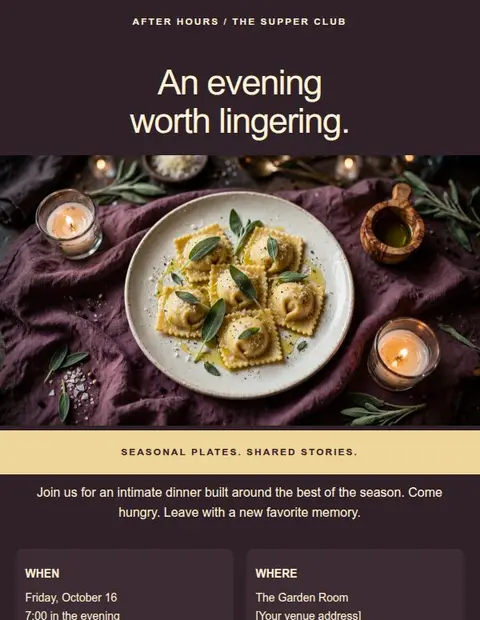
After Hours

Supper club invitation

EXAMPLE DESIGN

Supper club invitation

After Hours

Invite guests to a supper club with the menu, date, ticket price, and a booking link.

Customize it in your account.

  • Replace the sample brand, copy, and images.
  • Set your button destination and footer links.
  • Check the desktop and phone views, then save your design.
View templates in the appExplore this category

Fictional example. All templates are included on Free. Sign in or create an account, then find After Hours in the full template library.

Offscript

Creative workshop

EXAMPLE DESIGN

Creative workshop

Offscript

Explain what people will make in a workshop and give them a link to book a place.

Customize it in your account.

  • Replace the sample brand, copy, and images.
  • Set your button destination and footer links.
  • Check the desktop and phone views, then save your design.
View templates in the appExplore this category

Fictional example. All templates are included on Free. Sign in or create an account, then find Offscript in the full template library.

The Mind Lab

Brain science webinar

EXAMPLE DESIGN

Brain science webinar

The Mind Lab

Introduce a webinar topic, explain the session details, and collect registrations through your event page.

Customize it in your account.

  • Replace the sample brand, copy, and images.
  • Set your button destination and footer links.
  • Check the desktop and phone views, then save your design.
View templates in the appExplore this category

Fictional example. All templates are included on Free. Sign in or create an account, then find The Mind Lab in the full template library.

Example designs with fictional content, not app screenshots. Sign in to preview and edit the templates. Replace the sample details before sending.

Put the date and joining details near the button.

Explain what people will learn or do, then give the date, time zone, and location or online joining method. Mention the price and anything they should bring. Readers should have enough information to decide before opening the registration page.

Tips for this type of email

  • Include the year and time zone, not just the time.
  • Keep the registration link close to the event details.
  • Check that the agenda reads in the right order on a phone.
Read the design guide

Start with the Free plan

Create and download
your first email for free.

Create an account, verify your email address, and choose a template to edit.

Create a free accountSave up to 3 designs. No credit card required.